
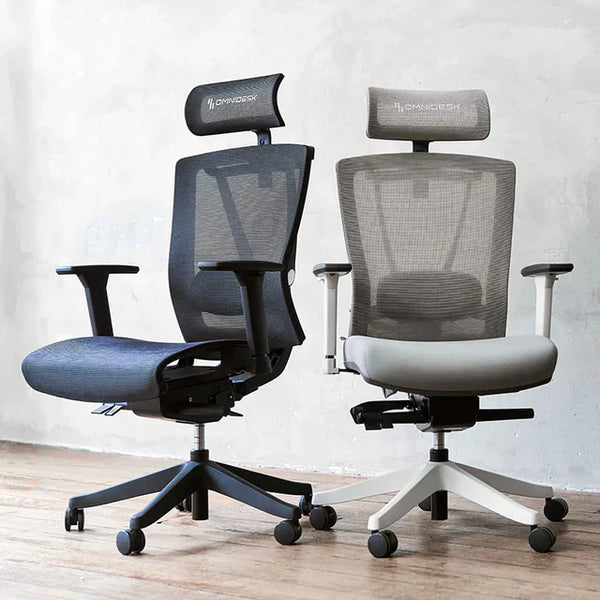
• Embrace Pro - Cushion $700.00 $600.00
    Black
    Light Grey
  • Entwined Pro Ergonomic Chair $599.00
    Black
    White
  • Kaze Mesh Ergonomic Chair $550.00
    Charcoal
    Light Grey

The healthiest working position is always your next one.

Keep Moving

A standing desk is an important part of creating a healthier, more comfortable workspace, but it should not be used in isolation. The best working position is not sitting or standing all day. It is regularly changing between the two.

A well-designed ergonomic office chair supports your back, shoulders and hips while seated, while a sit-stand desk makes it easier to get up, move and reset your posture throughout the day. Together, they create a more dynamic working environment that can help reduce the discomfort associated with staying in one position for too long.

Whether you work from home or in the office, your chair should support you when you sit and your desk should encourage you to get out of it regularly.

Sitting Still Has an Important Role.

A More Dynamic Way to Work

Omnidesks chairs are designed to support movement, comfort and better posture throughout the day. But thats only the beginning. The right ergonomic chair can help you maintain a supported posture, stay focused and work comfortably for longer. Look for adjustable features that allow the chair to suit your body, including lumbar support, seat height, armrests, recline tension and seat depth.

The most effective way to avoid pain and keep energy levels at optimum levels is to find a sit-stand routine is one that feels natural and sustainable. Alternate between sitting and standing, take regular movement breaks and adjust your workstation throughout the day rather than remaining in any single position for extended periods.

The Omnidesk Embrace.

Our bestseller chair. The Embrace ticks all the boxes for adjustment, superior build quality, great looks and extreme comfort.

Ergonomic Chair Adjustment Tips

Set the Correct Seat Height

Adjust the seat height so your feet rest flat on the floor, with your knees positioned at roughly the same height as your hips. Your thighs should feel supported without pressure behind the knees. If your feet do not comfortably reach the floor, consider using a footrest. A correctly set seat height helps create a stable base and supports better posture throughout your entire working day.

Support your Lower Back

Position the lumbar support so it fits comfortably into the natural curve of your lower back. It should provide gentle, consistent support without forcing your spine too far forward. If your chair allows height or depth adjustment, make small changes until it feels supportive rather than restrictive. Good lumbar positioning can reduce slouching and help maintain a more comfortable seated posture throughout longer work periods.

Adjust the Armrests

Adjust the armrests so your shoulders remain relaxed and your elbows sit close to your body at around a right angle. The armrests should support your forearms without lifting your shoulders or forcing your wrists upward. If they interfere with your desk, lower or move them aside. Proper armrest positioning can reduce tension through the neck, shoulders and upper back during longer periods of desk-based work.

Use the Recline Function

Use the recline function to encourage movement rather than locking the backrest in one fixed position all day. A slight recline can reduce pressure on the lower back and allow your body to shift naturally as you work. Adjust the recline tension so the chair supports you without feeling too loose or rigid. Regularly changing position helps create a more dynamic and comfortable seated working experience.

Reimagine your entire office

View our other product ranges

Message Us

Email sales@theomnidesk.com.au or use livechat

Call Us

(03) 9917 3730

Our office hours are from 11:00AM to 7:00PM from Monday to Friday.

Omnidesk Retail Store

400 Dynon Road, West Melbourne Vic 3003. Monday - Friday 11AM - 7PM | Saturday 12PM - 5PM